Section 1 · Web App
DAPH Online
เปิด DAPH OnlineOpen DAPH Online
↓ เลื่อนลงเพื่อดูรายละเอียดเพิ่มเติม↓ Scroll for more details
innovageotech.com / analysis / daph
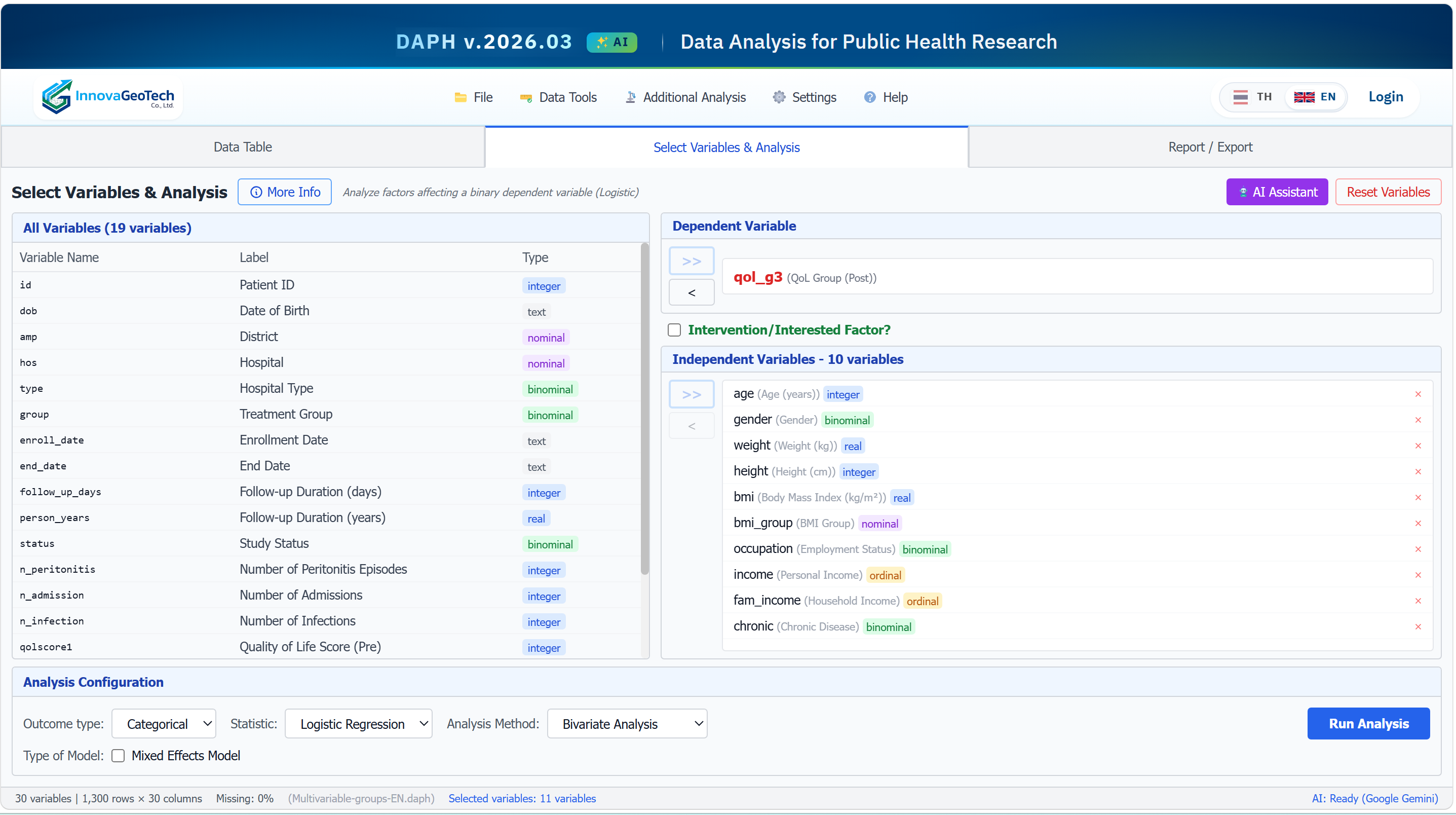
เปิดใช้ได้ทันทีในเบราว์เซอร์ — ไม่ต้องติดตั้ง ไม่ต้องตั้งค่า ข้อมูลของคุณประมวลผลบนเซิร์ฟเวอร์ InnovaGeoTech Launch instantly in your browser — no install, no setup. Your data is processed on InnovaGeoTech's servers.
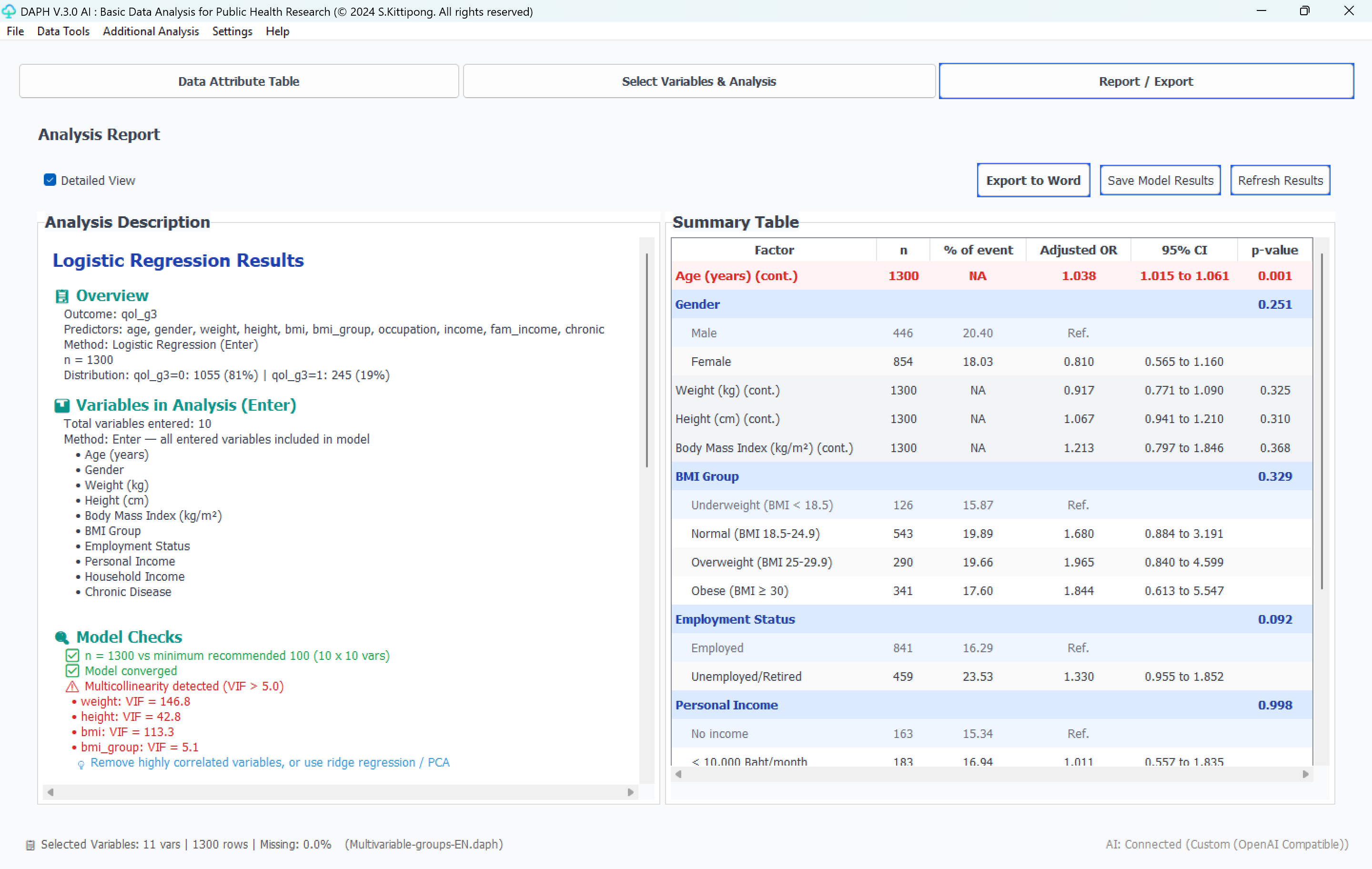
- ✓อัพโหลด CSV / Excel / SPSS แล้วเริ่มวิเคราะห์ได้ทันทีUpload CSV / Excel / SPSS and start analyzing in one click
- ✓สถิติเชิงระบาดวิทยา: t-test, ANOVA, Chi-square, Regression · Post Hoc อัตโนมัติ สำหรับ One-way / Two-way / Repeated Measures ANOVA และ Kruskal-Wallis (ระบบตรวจความแปรปรวนและขนาดกลุ่มแล้วเลือก Tukey HSD, Tukey-Kramer, Games-Howell, paired t + Holm หรือ Dunn + Holm ให้ หรือเลือกเองได้)Epi statistics: t-test, ANOVA, Chi-square, Regression · Automatic post hoc for One-way / Two-way / Repeated Measures ANOVA and Kruskal-Wallis (DAPH checks the variances and group sizes and picks Tukey HSD, Tukey-Kramer, Games-Howell, paired t + Holm or Dunn + Holm, or you choose)
- ✓ANCOVA, Survival (Cox/KM), Count (Poisson/NB) regression, Log-binomial Regression (Risk Ratio · เปลี่ยนเป็น Modified Poisson อัตโนมัติ เลือกตัวแปรได้ 5 วิธีแบบ Logistic) — ฟรีทุกแพ็กเกจ · Mixed effect, GEE, RM-ANOVA, Ordered/Multinomial Logistic — ฟรีทุกแพ็กเกจ · Machine Learning Comparison (เปรียบเทียบโมเดล + SHAP + DCA, Trial/Paid) · Path Analysis (SEM/GSEM) — ทางตรง/อ้อม/รวม + causal mediation (Trial/Paid) · Factor Analysis (EFA/CFA) — ค่าน้ำหนัก + ความเชื่อมั่น (α/ω) + ความตรง (CR/AVE, Fornell-Larcker/HTMT2) (ฟรีทุกแพ็กเกจ) · Structural Equation Modeling (SEM & GSEM) — CFA + เส้นทางโครงสร้าง (ตัวแปรแฝง), categorical OR/RRR + causal mediation (ฟรีทุกแพ็กเกจ)ANCOVA, Survival (Cox/KM), Count (Poisson/NB) regression, Log-binomial Regression (risk ratios · modified Poisson automatically when needed · the five variable-selection methods of logistic regression) — free for every plan · Mixed effect, GEE, RM-ANOVA, Ordered/Multinomial Logistic — free for every plan · Machine Learning Comparison (multi-model + SHAP + DCA, Trial/Paid) · Path Analysis (SEM/GSEM) — direct/indirect/total + causal mediation (Trial/Paid) · Factor Analysis (EFA/CFA) — loadings + reliability (α/ω) + validity (CR/AVE, Fornell-Larcker/HTMT2) (free for every plan) · Structural Equation Modeling (SEM & GSEM) — CFA + structural paths (latent), categorical OR/RRR + causal mediation (free for every plan)
- ✓แผนที่ความเสี่ยงโรคแบบเบย์ (Bayesian disease mapping) — BYM2 (Riebler 2016): ความเสี่ยงสัมพัทธ์รายพื้นที่ที่ยืมข้อมูลจากเพื่อนบ้าน · สัดส่วนความแปรปรวนเชิงพื้นที่ φ · ความน่าจะเป็นที่ความเสี่ยงเกินเกณฑ์ (พื้นที่ที่ควรจัดลำดับความสำคัญ) · เทียบแบบจำลองด้วย PSIS-LOO · แผนที่สองโรคร่วมกัน (ρ) · ไม่ลู่เข้าไม่แสดงผล (beta — ผู้ดูแลระบบก่อน)Bayesian disease mapping — BYM2 (Riebler 2016): area relative risks borrowing strength from neighbours · spatial fraction φ · exceedance probabilities (priority areas) · PSIS-LOO model comparison · two-outcome joint mapping (ρ) · no result without convergence (beta — administrators first)
- ✓อนุกรมเวลา (Time-Series) — แนวโน้ม Mann-Kendall/Sen · แยกฤดูกาล STL · ACF/PACF · พยากรณ์ SARIMA/Holt-Winters พร้อมตัวทำนาย · สหสัมพันธ์ไขว้ · Interrupted Time Series (จุดเดียว · ค่อย ๆ เริ่ม · ชั่วคราว) · การถดถอยอนุกรมเวลา (distributed lags · พจน์ AR · Newey-West/Prais-Winsten/ARIMA errors) พร้อมช่วงเชื่อมั่น 95% ทุกค่า และรายงาน Word ระดับวารสาร (Pro / Premium / ทดลองใช้ 30 วัน)Time-Series — Mann-Kendall/Sen trend · STL decomposition · ACF/PACF · SARIMA/Holt-Winters forecasts with predictors · cross-correlation · Interrupted Time Series (จุดเดียว · ค่อย ๆ เริ่ม · ชั่วคราว) · Time-Series Regression (distributed lags · AR terms · Newey-West/Prais-Winsten/ARIMA errors), with 95% CI on every estimate and journal-ready Word reports (Pro / Premium / 30-day trial)
- ✓การวิเคราะห์เชิงพื้นที่: Local Moran's I (LISA) Univariate + Bivariate — Moran scatter + แผนที่ LISA cluster ครบ (ฟรีทุกแพ็กเกจ) · Getis-Ord (G / Gi / Gi*) Hot Spot Analysis + cluster map — ตรวจค่ากับ R ไว้ใน DAPH Guide (ฟรีทุกแพ็กเกจ) · Distribution Map (Choropleth + KDE Heat, 35 จานสี, เส้นขอบเขตตามคอลัมน์ที่เลือก เช่น รายเขตหรือรายจังหวัด พร้อมกำหนดสีเส้นได้, ฟรีทุกแพ็กเกจ) · Spatial Regression — ฟรีทุกแพ็กเกจ (OLS / SLM / SEM / SDM พร้อม Anselin LM-cascade + ผลกระทบ direct/spillover/total ของ LeSage–Pace) · Spatial Panel Regression (พื้นที่ × เวลา — Pooled OLS · FE/RE × Lag/Error + Hausman-type test · รับตารางรายปีแบบ wide) · Spatial Machine Learning (พิกัด + spatial lag เป็นตัวแปร · Spatial Block CV · Moran ของค่าคลาดเคลื่อน · แผนที่ค่าทำนาย/ค่าคลาดเคลื่อน) — รับ shapefile (.zip) โดยตรงSpatial analysis: Local Moran's I (LISA) Univariate + Bivariate — Moran scatter + LISA cluster maps (free for every plan) · Getis-Ord (G / Gi / Gi*) Hot Spot Analysis + cluster map — values checked against R in the DAPH Guide (free for every plan) · Distribution Map (Choropleth + KDE Heat, 35 palettes, boundary lines by a column you choose, such as districts or provinces, in the colours you choose, free for every plan) · Spatial Regression — free for every plan (OLS / SLM / SEM / SDM with Anselin LM-cascade + LeSage–Pace direct/spillover/total effects) · Spatial Panel Regression (areas × time — Pooled OLS · FE/RE × Lag/Error + Hausman-type test · accepts a wide year-by-column table) · Spatial Machine Learning (coordinates + spatial lags as features · Spatial Block CV · residual Moran · predicted / residual maps) — accepts shapefile (.zip)
- ✓ผู้ช่วย AI ช่วย draft คำอธิบายผลและบทความ เพื่อให้นักวิจัยตรวจสอบและปรับเอง (Pro เท่านั้น)AI assistants draft interpretations and papers for you to review and refine (Pro only)
- ✓ส่งออกผลลัพธ์: Word, Excel, PDF พร้อม citationsExport: Word, Excel, PDF with citations
- ✓เชื่อมต่อกับ Maps และ Research Post ของ InnovaGeoTechIntegrated with InnovaGeoTech Maps and Research Posts
ไม่ต้องติดตั้งNo install
ใช้งานข้ามเครื่องCross-device
อัพเดตอัตโนมัติAuto-updated
เปิด DAPH OnlineOpen DAPH Online